
#面白いを実現しろ Make the bold idea real.
Produce your IDEA.
Think of the bold idea. Then make it real.
From before the deal to after the settlement — one more pair of hands that runs the whole job joins your team.
The AI agent built for event producers.
Excuses
Excuses don't survive execution.
Problems
Three things that stop ideas from happening.
It's not a shortage of ideas. It's a shortage of hands.
-
01
Run it from memory
Fifty projects, all in your head.
Status, deadlines, open items. The one that stalls is always the quiet one.
The AI remembers every project.
-
02
Miss the message
The late-night LINE never made it into the deck.
Email, Messenger, LINE. Revisions come from three directions.
Three channels watched at once. Applied, then reported.
-
03
Start from zero
Every proposal and estimate, written from scratch.
Half a day on a draft. Thinking time, gone.
The draft is already there. You only polish.
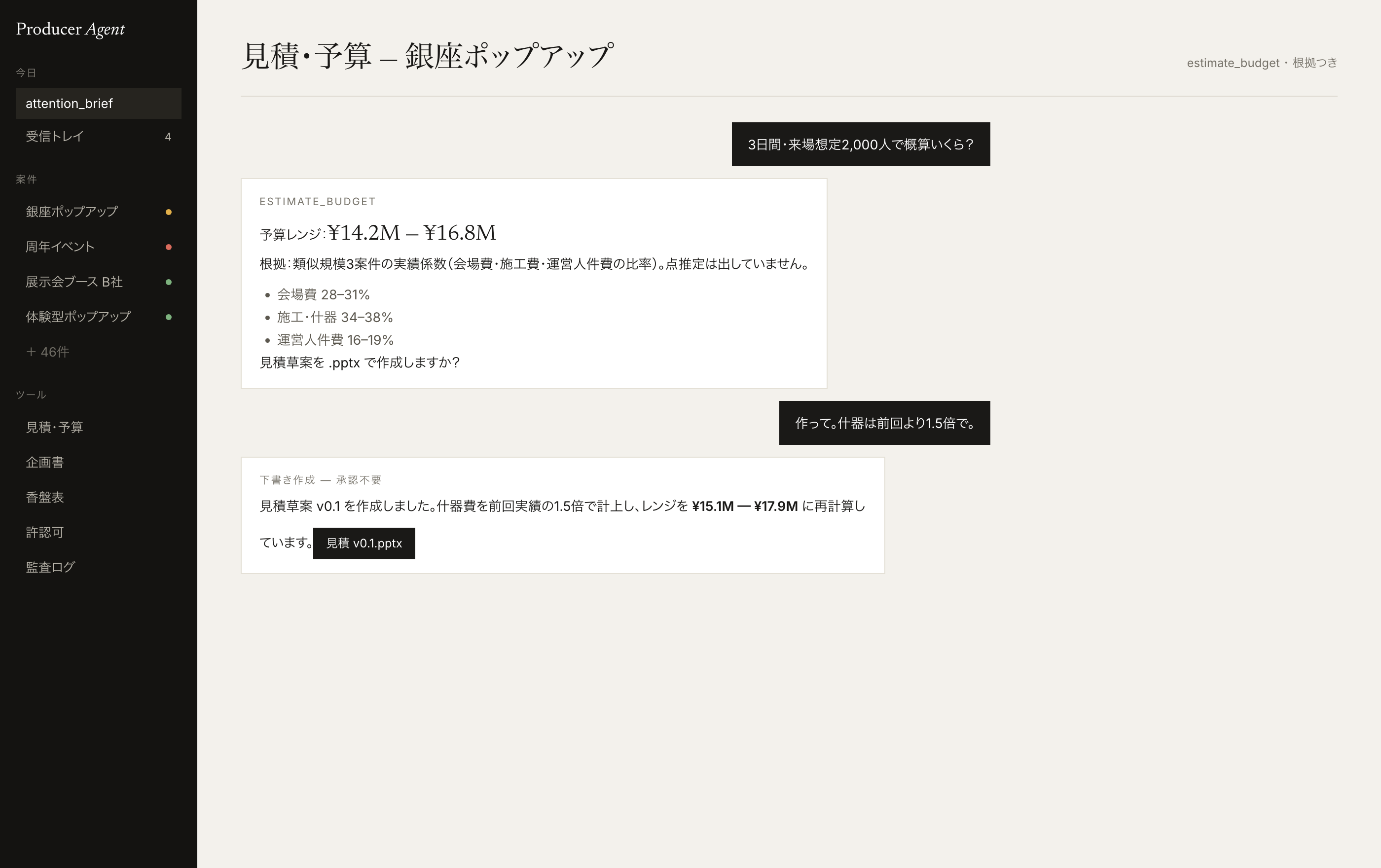
The budget is already on the table.
A range built from real projects, with a draft estimate. Ready before the meeting.
Estimates & budget
Doors open. A crowd, from behind.
The new concept is already standing.
From the behavior you want to change and the audience, to a concept and a draft proposal.
Proposals
A hand on the truss.

Cable runs across the floor, overhead.
The precedent? We just made one.
Whether it can be done is already checked — the paperwork and the venue's conditions.
VenueProduct screens and feature pages are currently in Japanese.
Strategy
The event is not the goal.
An anniversary, a launch, a reorg. Find the trigger, put the reason into words, decide whose behavior should change. The pitch starts long before the plan.
Find the seed of the job.
Industry news, anniversaries, reorgs, budget cycles, tenders. Spot the opening — and never miss last year's client coming back.
Pitch the reason to do it.
Why this event, why now. Read the client's situation and walk in with the reason and the aim already written.
Set the strategy and the brief.
Whose behavior, changed how. Define the goal, the audience, the scale, the budget range and what success looks like — first.
Products
From winning the job to making it real. Nine steps.
-
01
Sales signals
Anniversaries, reorgs, budget cycles. Find the seed of the job first.
Details -
02
Strategy & brief
Why do it. Whose behavior, changed how. It starts here.
Details -
03
Concept
Whose what are we changing? Build the concept from the behavior-change goal.
Details -
04
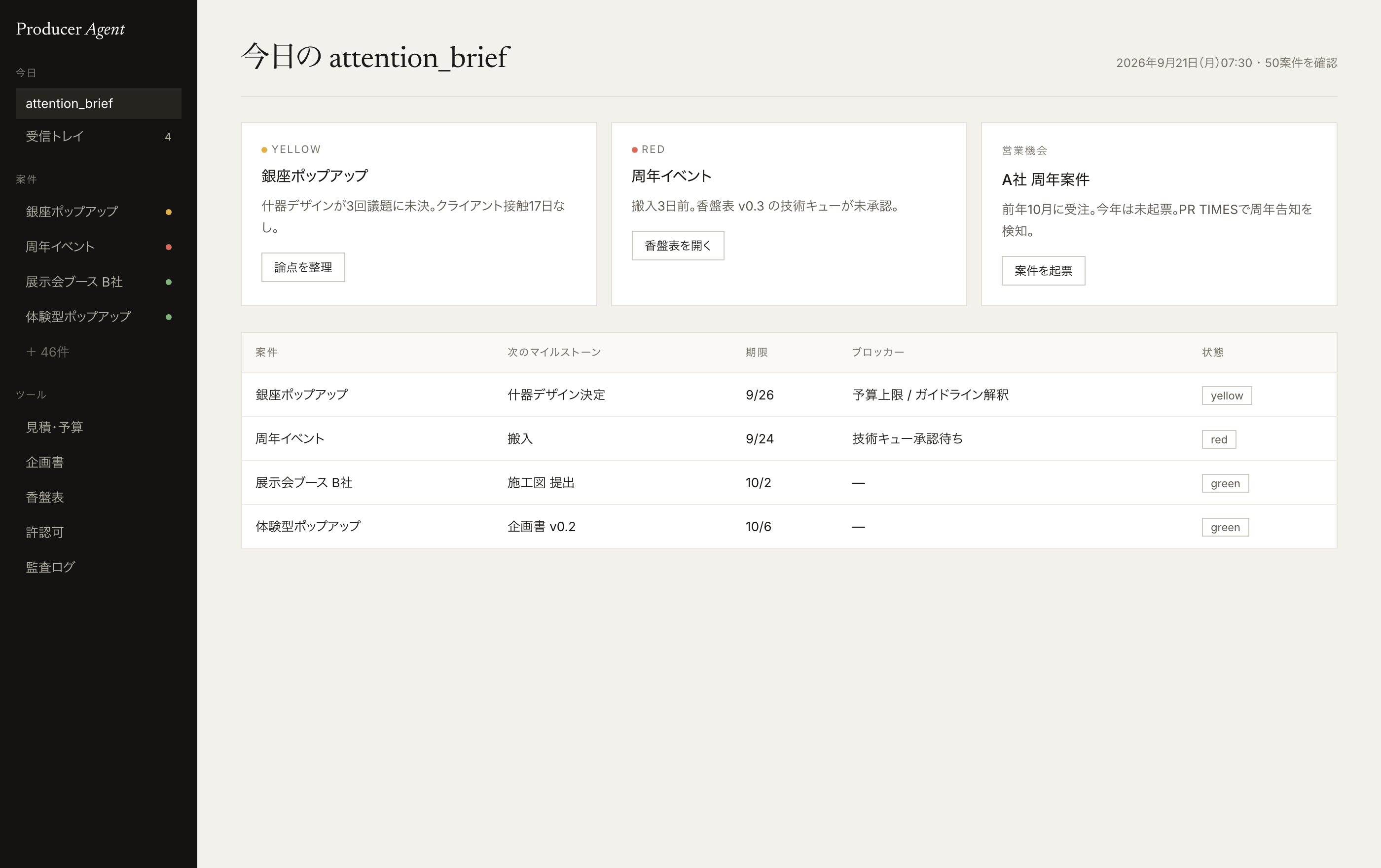
Project management
Fifty projects, none of them stalled. In the morning, look only at red and yellow.
Details -
05
Estimates & budget
A ballpark the moment you're asked — as a range, with the basis.
Details -
06
Proposals
The plan starts from a draft. No more blank page.
Details -
07
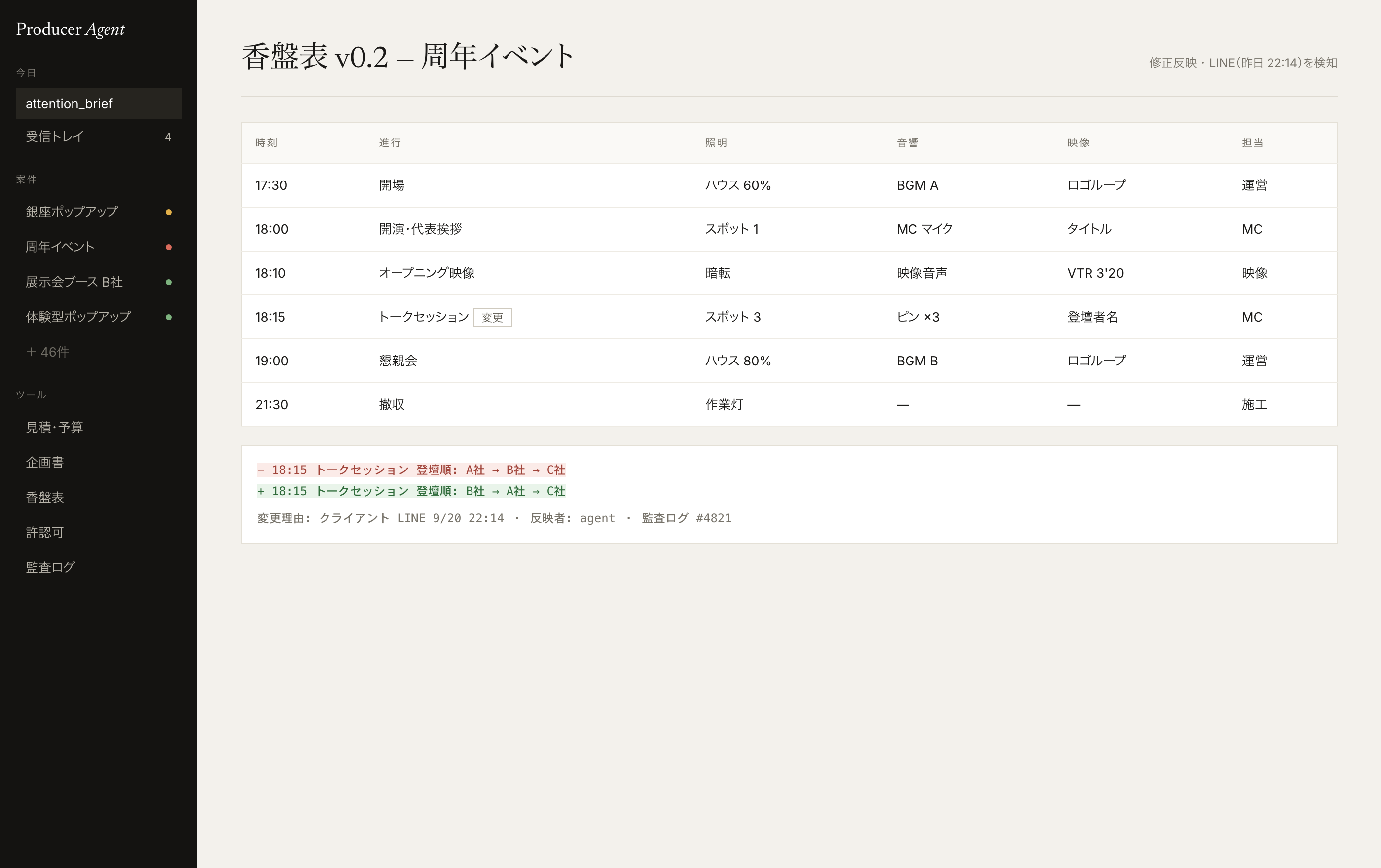
Run-of-show manual & script
The whole day in one document. However often it changes, there is one current version.
Details -
08
Venue
The answer is there before you call the venue.
Details -
09
Channel integration
Revisions are in by morning. The late-night LINE message included.
Details
Hard floor
Everything is already moving.
Research. Draft. Revise. Line it all up.
Nobody asked — and it's done by morning.
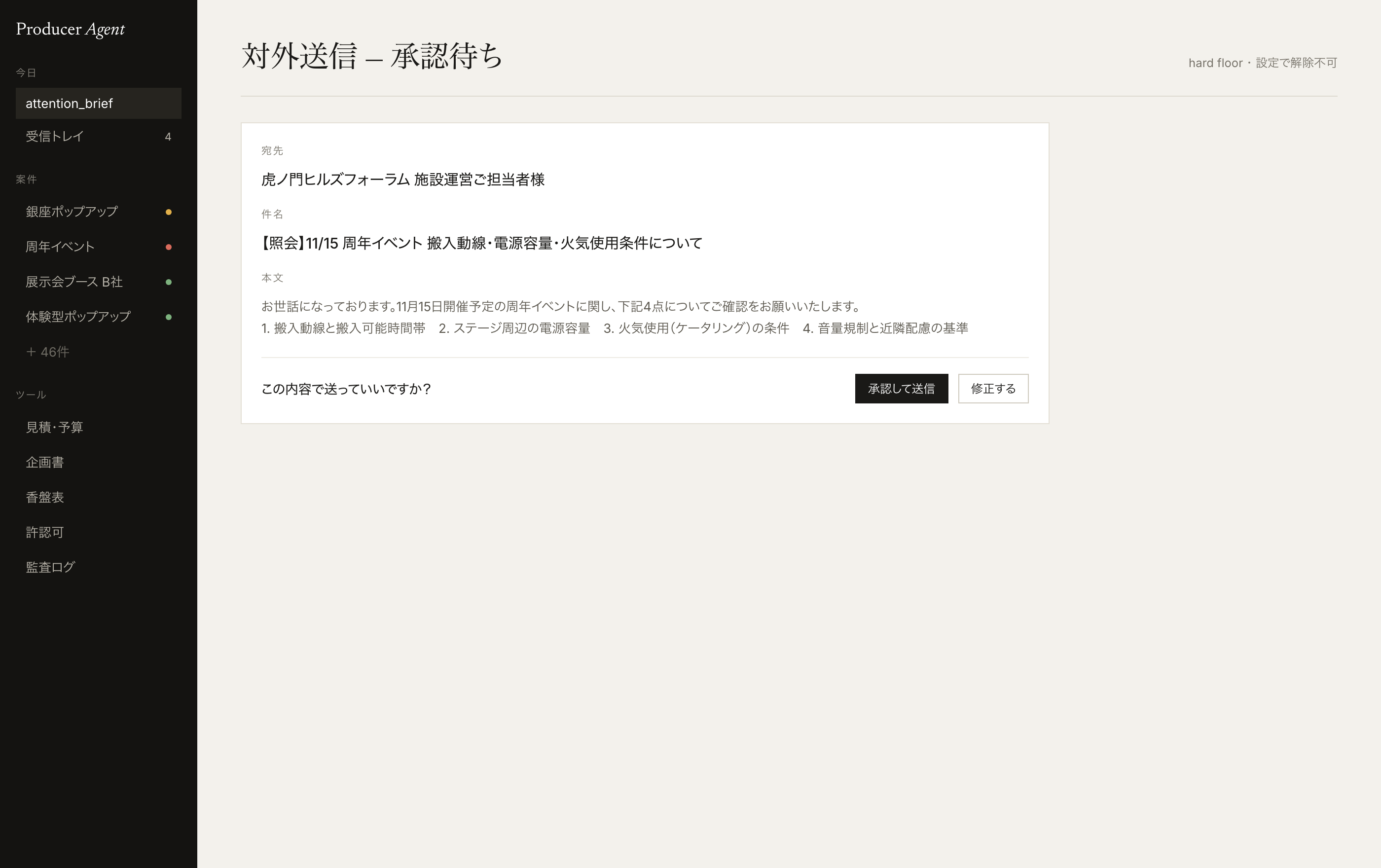
All you say is "yes", right before anything goes out the door.
How it operates
Moving before you ask.
Three modes.
-
01.
No approval needed
Make
Proposals, draft estimates, run-of-show. If it's a draft, it's made before you ask.
-
02.
No approval, reported after
Fix
Apply a revision, then report exactly what changed. Never silently.
-
03.
One-word approval required
Send
Sending, submitting, ordering, paying. "OK to send this?" — the one line that can't be switched off.
Grows with you
The more you use it, the more it works like you.
It learns how you plan and how you deliver. Project by project, it starts making your calls.
Learns your habits
How you frame a plan, the words you choose. Its drafts move toward yours (opt-in visibility).
Never forgets a lesson
Something learned once comes back on its own at the next similar site.
Cases become weapons
Every project you finish feeds the similarity and content-risk checks.
Your past files, on your side
Reads proposals and estimates from Drive, Dropbox and your PC into new work.
Can do
From sales to settlement. The whole job.
Winning the work. Setting the strategy. Making it real. One agent, end to end.
Project & pipeline management
- All projects' pipeline, deadlines, open items and blockers in one place
- Backward-planned scheduling anchored to load-in/out dates and the next milestone
- Automatic "what to do today" briefing every morning
- Identifies which project a message refers to (asks rather than guessing when ambiguous)
- Auto-detects staffing, vendor and approval conflicts
Quotes, budget & permits
- Estimates a budget range from project scale (with basis, never a single number)
- Budget-vs-actual tracking with margin-erosion alerts
- Determines required floor area, permit needs and the responsible authority
- Numbers always come straight from tool computations — no mental math, no fabrication
Documents & revisions
- Auto-generates proposal and quote drafts (.pptx export)
- Builds concepts grounded in behavior-change goals and target audience
- Auto-generates run-of-show sheets, scripts and emergency contact lists
- Applies client revision requests and reports exactly what changed
- Every change is version-controlled with a diff and written to the audit log
Venue & vendor due diligence
- Drafts inquiry emails to venues and vendors
- Parses replies and extracts the terms offered
- Checks venue and build-out technical specs for inconsistencies
- Never sends without showing you the content and getting one-word approval
Connection dashboard
- A dedicated dashboard arrives right after signup, showing connection status at a glance
- Connect or disconnect Messenger, Gmail, Google Drive, Dropbox and LINE with one click
- We never handle or store your credentials on your behalf, by design
- If a link ever leaks, reissue and invalidate it with one click
Multi-channel integration
- Connect Messenger, LINE and Gmail yourself with one click
- Client revision requests are detected from any connected channel
- Always summarizes what it changed — never edits silently
- We never handle your credentials on your behalf
Sales signals & upsell
- Detects sales signals from press-release feeds and industry news
- Factors in anniversaries, org changes, budget cycles and public tenders
- Catches missed repeat-project opportunities from last year's clients
- Scores pre-sales pipeline likelihood
Déjà-vu & content-risk review
- Checks similarity against past case studies
- Reviews for reputational and rights-related content risk
- Builds an observation log you can search in reverse
- Extracts meeting structure signals (decided / on hold / conflicting)
Hospitality & on-site support
- Suggests venues, gifts and seating for client dinners
- Proposes response plans grounded in on-site constraints
- Safety-critical calls (cancellation, evacuation, entry restriction) always go to a human
- Hands off on-site decisions with the reasoning made explicit
Past documents & cloud storage
- Connect Google Drive or Dropbox, read-only, with one click
- Full-text search past proposals, quotes and minutes by filename and content
- Reads Google Docs/Sheets/Slides and Dropbox Paper into new proposals
- The more you use it, the sharper its proposals get — grounded in your own history
Local files on your PC
- A lightweight sync tool indexes files in the folders you choose
- Text, Markdown, CSV and JSON are full-text searchable
- File contents never reach our servers — only extracted text is synced
- PDFs and images aren't text-extracted yet (filename search only; we don't guess content)
Governance & audit
- Every action is logged — who, when and what
- Each action type is classified as autonomous or approval-required
- Analyzes your working patterns for its benefit only (opt-in visibility, never used to evaluate you)
- Auto-downgrades to approval-required based on amount, count, recipient or time of day
Comparison
Why dedicated.
| × Spreadsheet + manual | △ General AI chat | ■ PRODUCER AGENT | |
|---|---|---|---|
| Cross-project state | Relies on your memory and file organization | Holds no project data — you re-explain every time | Holds every project's state at all times, briefs you automatically |
| Number accuracy | Risk of manual calculation and entry errors | Can generate plausible-sounding but fabricated numbers | Numbers always come straight from a deterministic calculation |
| Guardrails | N/A — a human executes everything | No domain-specific guardrails in the tool itself | External sends sit behind a hard floor that can't be disabled |
| Client channels | Email, chat etc. checked manually, one by one | Chat only — no external channel integration | Detects across Messenger, LINE and Gmail automatically |
| Revision traceability | Change history is often lost | Chat logs exist but aren't tied to project documents | Version-controlled with a diff, recorded in the audit log |
| Proactive alerts | Whoever notices, checks — eventually | Does nothing unless asked | Scans deadlines, margins and sales signals on a schedule and reports on its own |
Getting started
Start today.
Just a Google account.
-
1
Sign up with Google
No card. Your own account.
-
2
Your dashboard arrives
An API key and a connection-dashboard link. Nobody but you can act as you.
-
3
Connect with one click
Messenger, Gmail, Drive, Dropbox, LINE. We never touch your credentials.
-
4
Say hello
"What's on today?" — that's where it starts.
Pricing
One seat's price. One more pair of hands.
- 5 credits (first month only)
- Full access to core features
- No credit card required
- 140 credits every month
- LINE / Messenger / Gmail integration
- Extra credit packs available
- 450 credits every month
- Priority support
- Extra credit packs available
Prices are in Japanese yen, tax included. One message uses one credit (the Script AI uses none). When your balance reaches zero, the service stops — nothing is purchased automatically. The service is currently offered to users in Japan.
FAQ
Questions
An AI agent that takes on the producer's work — planning, estimating, scheduling, venue coordination and on-site support — as a co-pilot. PRODUCER AGENT keeps the state of every parallel project, drafts proposals, estimates and run sheets, detects and applies client change requests, produces evidence-based budget ranges and rules on permit requirements. It is not an event about AI.
Three ways. It holds your project data, so you never re-explain the context. It acts before being asked: deadlines, margins and sales signals are checked on a schedule and reported on its own. And it treats numbers and external sends differently: budgets, floor area and permits always come from deterministic calculations, never plausible generation; sending, submitting, ordering and paying require human approval — a hard floor that cannot be switched off.
Event producers who run several projects at once: freelance and independent producers, and event leads at agencies, event companies and PR firms. Plans are per person, not per team, and you sign up yourself with a Google account.
The Trial plan (¥0) includes 5 credits for the first month with full access to core features — no credit card. Paid plans are Individual at ¥12,000 per month (140 credits, LINE / Messenger / Gmail integration) and Pro at ¥35,000 per month (450 credits, priority support), tax included. Extra packs are 100 credits for ¥11,000 or 500 credits for ¥55,000. One message uses one credit; when your balance reaches zero the service stops, and nothing is purchased automatically.
You can start the same day, in four steps: sign up with Google → receive your API key and connection-dashboard link → connect Messenger, LINE, Gmail, Google Drive and Dropbox with one click each → say "What's on today?". Projects can be registered just by chatting. No onboarding project, no team contract.
Yes, and no. You connect each channel yourself from the dashboard; we never enter or store your credentials. Once connected, change requests from any channel are detected, applied to the right project's documents and reported back with a summary of what changed. You can disconnect with one click, and if a dashboard link leaks you can reissue it and invalidate the old one.
No. Autonomy is scoped in three tiers by action type. Drafting proposals, estimates and run sheets proceeds without approval. Updating internal documents (applying a change request, for example) proceeds without approval but is always summarized and reported immediately. External, irreversible actions — sending, submitting, ordering, paying — always stop at "OK to send this?" and wait for your yes. That third tier is a hard floor that cannot be disabled.
Proposal and estimate drafts export to .pptx. Run sheets (cue sheets), scripts and emergency contact lists are generated as well. Every revision applied from a client request is versioned with a diff and written to the audit log, so there is always one current version.
Yes. Connect Google Drive or Dropbox (read-only) and it searches past proposals, estimates and minutes by file name and content, and folds them into new proposals and estimates. Files on your PC can be indexed with a lightweight sync tool: only extracted text is synced, never the files themselves. PDFs and images are currently searched by file name only; content is never guessed.
It grows into your way of working. With each project it accumulates the judgment patterns of that client and that producer, and proposals get sharper. Observations from the field build up as a stock that is recalled automatically in similar situations, and the growing case base feeds the déjà-vu and content-risk checks. Analysis of your own framing habits is opt-in and may not be used for evaluation.
Roadmap
Excuses we'll cross out next.
Not built yet. Already in our sights.
-
01ComingYou can't measure it.
Multi-layer KPI tracking
From attendance rate, satisfaction, NPS and UGC volume to deal conversion and mission alignment — one place for quantitative, qualitative and behavior-change metrics.
-
02ComingWe'll deal with it later.
Sustainability & accessibility checks
Checks material recyclability and accessibility compliance at the planning stage.
-
03ComingIt's over when it's over.
MA/CRM integration
Feeds session-attendance logs and post-event surveys into sales/CRM systems to surface hot leads.
-
04ComingOn-site is enough.
Hybrid streaming design support
Works through the technical requirements and stream architecture for combining in-person and online attendance.
-
05ComingWhich file is current?
Broader storage & real-time sync
Google Drive, Dropbox and local PC files are already supported. Next: Box and other storage systems, plus real-time file-update sync.
- Roadmap Produce your IDEA. #面白いを実現しろ
#面白いを実現しろ Make the bold idea real.
Produce your IDEA.
No credit card.
From today, ideas move faster.